SteelEngine automatically tracks usage for all workflow executions so you can optimize workflows and manage your budget effectively.
Credits
SteelEngine uses credits as the unit of measurement for all usage. All plan limits, usage meters, and billing thresholds are displayed in credits throughout the SteelEngine UI. Current plan pricing and your credit balance are always available in Settings → Subscription.
How Costs Are Calculated
Every workflow execution includes two cost components:
Base Execution Charge: 1 credit per execution
AI Model Usage: Variable, based on token consumption — each model call's input and output tokens are converted to credits using the model provider's current per-token rates.
Workflows without AI blocks only incur the base execution charge.
Model Breakdown in Logs
For workflows using AI blocks, you can view detailed cost information in the logs:
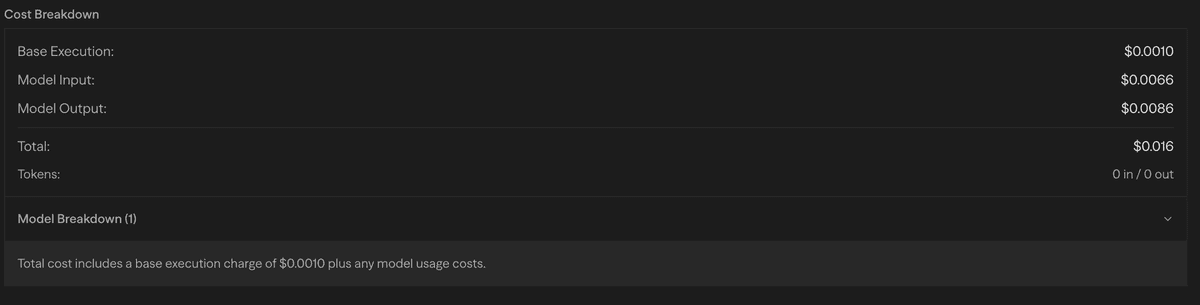
The model breakdown shows:
- Token Usage: Input and output token counts for each model
- Cost Breakdown: Individual costs per model and operation
- Model Distribution: Which models were used and how many times
- Total Cost: Aggregate cost for the entire workflow execution
Hosted Models vs. Bring Your Own Key
Hosted Models — SteelEngine provides managed API keys for Agent blocks. Hosted usage applies a small multiplier (currently 1.1x) on top of the provider's base token rates to cover infrastructure and API management.
Bring Your Own Key (BYOK) — Use your own provider API keys and pay providers directly at their base rates, with no SteelEngine markup. Local models through Ollama or VLLM incur no model API cost at all — only the base execution charge.
Provider token rates change frequently. Check each provider's own pricing page for current per-token rates.
Bring Your Own Key (BYOK)
Use your own API keys for AI model providers instead of SteelEngine's hosted keys.
Supported Providers
| Provider | Usage |
|---|---|
| OpenAI | Knowledge Base embeddings, Agent block |
| Anthropic | Agent block |
| Agent block | |
| Mistral | Knowledge Base OCR |
Setup
- Navigate to Settings → BYOK in your workspace
- Click Add Key for your provider
- Enter your API key and save
BYOK keys are encrypted at rest. Only workspace admins can manage keys.
When configured, workflows use your key instead of SteelEngine's hosted keys. If removed, workflows automatically fall back to hosted keys with the multiplier.
Voice Input
Voice input uses ElevenLabs Scribe v2 Realtime for speech-to-text transcription. It is available in Chat and in Hosted Chat voice mode.
| Context | Cost per session | Max duration |
|---|---|---|
| Chat (workspace) | ~5 credits | 3 minutes |
| Deployed chat (voice mode) | ~2 credits | 1 minute |
Each voice session is billed when it starts. In Hosted Chat voice mode, each conversation turn (speak → agent responds → speak again) is a separate session. Multi-turn conversations are billed per turn.
Voice input requires ELEVENLABS_API_KEY to be configured. When the key is not set, voice input controls are hidden.
Plans
SteelEngine offers a free Community plan, three self-serve paid plans, and a sales-assisted Enterprise plan. Builder is for one person; Team and Scale use a flat workspace subscription and pool credits across the organization.
| Plan | Credits Included | Members | Daily Refresh |
|---|---|---|---|
| Community | 1,000/mo | 1 | — |
| Builder | 6,000/mo | 1 | +50/day |
| Team | 24,000/mo pooled | Up to 5 | +200/day |
| Scale | 120,000/mo pooled | Up to 10 | +1,000/day |
| Enterprise | Custom | Custom | Custom |
Community usage renews at the start of each UTC calendar month. Team and Scale are flat-priced workspace plans; adding a member within the plan cap does not change the subscription price. Current prices for every plan are shown in Settings → Subscription; for Enterprise, contact sales@steelengine.com.
Daily Refresh Credits
Paid plans include a small daily credit allowance that does not count toward your plan limit. Each day, usage up to the daily refresh amount is excluded from billable usage. This allowance resets every 24 hours and does not carry over — use it or lose it.
| Plan | Daily Refresh |
|---|---|
| Builder | 50 credits/day |
| Team | 200 credits/day |
| Scale | 1,000 credits/day |
Team and Scale daily refresh amounts apply to the whole workspace and do not multiply by member count.
Annual Billing
All paid plans are available with annual billing at a discount. Switch between monthly and annual billing in Settings → Subscription.
On-Demand Billing
By default, your usage is capped at the credits included in your plan. To allow usage beyond your plan's included amount, you can either enable on-demand billing or manually edit your usage limit to any value above your plan's minimum.
- Enable On-Demand: Removes the usage cap entirely. You pay for any overage at the end of the billing period.
- Edit Usage Limit: Set a specific cap above your plan's included amount to control how much overage you're willing to allow.
- Disable On-Demand: Resets your usage limit back to the plan's included amount (only available if your current usage hasn't already exceeded it).
On-demand billing is managed by workspace admins for team plans. Non-admin team members cannot toggle on-demand billing.
Plan Limits
Rate Limits
| Plan | Sync (req/min) | Async (req/min) |
|---|---|---|
| Community | 50 | 200 |
| Builder | 150 | 1,000 |
| Team / Scale | 300 | 2,500 |
| Enterprise | 600 | 5,000 |
Team and Scale use the same execution rate limits.
Concurrent Execution Limits
| Plan | Concurrent Executions |
|---|---|
| Community | 5 |
| Builder | 50 |
| Team / Scale | 200 |
| Enterprise | 200 (customizable) |
Concurrent execution limits control how many workflow executions can run simultaneously within a workspace. When the limit is reached, new executions are queued and admitted as running executions complete. Manual runs from the editor are not subject to these limits.
File Storage
| Plan | Storage |
|---|---|
| Community | 5 GB |
| Builder | 50 GB |
| Team / Scale | 500 GB |
| Enterprise | 500 GB (customizable) |
Execution Time Limits
| Plan | Sync | Async |
|---|---|---|
| Community | 5 minutes | 90 minutes |
| Builder / Team / Scale / Enterprise | 50 minutes | 90 minutes |
Sync executions run immediately and return results directly. These are triggered via the API with async: false (default) or through the UI.
Async executions (triggered via API with async: true, webhooks, or schedules) run in the background.
If a workflow exceeds its time limit, it will be terminated and marked as failed with a timeout error. Design long-running workflows to use async execution or break them into smaller workflows.
Billing Model
SteelEngine uses a base subscription + overage billing model:
How It Works
Community and Builder:
- Your subscription includes the plan's monthly credits
- Usage under the included amount → No additional charges
- Usage over the included amount (with on-demand enabled) → Overage is billed per credit at the end of the billing period
Team and Scale Plans:
- Usage is pooled across all team members in the organization
- Overage is calculated from total team usage against the pooled limit
- Organization owner receives one bill
Enterprise Plans:
- Fixed subscription, no overages
- Custom usage limits per agreement
Threshold Billing
When on-demand is enabled and unbilled overage accumulates past a fixed threshold, SteelEngine automatically bills the outstanding amount mid-cycle. This spreads large overage charges throughout the month instead of one large bill at period end.
Usage Monitoring
Monitor your usage and billing in Settings → Subscription:
- Current Usage: Real-time credit usage for the current billing period
- Usage Limits: Plan limits with a visual progress bar
- On-Demand Billing: Toggle on-demand billing to allow usage beyond your plan's included credits
- Plan Management: Upgrade, downgrade, or switch between monthly and annual billing
Programmatic Usage Tracking
You can query your current usage and limits programmatically using the API:
Endpoint:
GET /api/users/me/usage-limitsAuthentication:
- Include your API key in the
X-API-Keyheader
Example Request:
curl -X GET -H "X-API-Key: YOUR_API_KEY" -H "Content-Type: application/json" https://steelengine.com/api/users/me/usage-limitsExample Response:
{
  "success": true,
  "rateLimit": {
    "sync": {
      "isLimited": false,
      "requestsPerMinute": 150,
      "maxBurst": 300,
      "remaining": 300,
      "resetAt": "2025-09-08T22:51:55.999Z"
    },
    "async": {
      "isLimited": false,
      "requestsPerMinute": 1000,
      "maxBurst": 2000,
      "remaining": 2000,
      "resetAt": "2025-09-08T22:51:56.155Z"
    },
    "authType": "api"
  },
  "usage": {
    "currentPeriodCost": 12.34,
    "limit": 100,
    "plan": "pro_6000"
  }
}
Rate Limit Fields:
requestsPerMinute: Sustained rate limit (tokens refill at this rate)maxBurst: Maximum tokens you can accumulate (burst capacity)remaining: Current tokens available (can be up tomaxBurst)
Response Fields:
currentPeriodCostreflects usage in the current billing period (in USD)limitis derived from the individual Community/Builder limit or the pooled Team/Scale/Enterprise organization limitplanis the highest-priority active plan associated with your user
Cost Optimization Strategies
- Model Selection: Choose models based on task complexity. Simple tasks can use smaller, cheaper models while complex reasoning might need frontier models.
- Prompt Engineering: Well-structured, concise prompts reduce token usage without sacrificing quality.
- Local Models: Use Ollama or VLLM for non-critical tasks to eliminate API costs entirely.
- Caching and Reuse: Store frequently used results in variables or files to avoid repeated AI model calls.
- Batch Processing: Process multiple items in a single AI request rather than making individual calls.
Next Steps
- Review your current usage in Settings → Subscription
- Learn about Logging to track execution details
- Explore the External API for programmatic cost monitoring
- Check out workflow optimization techniques to reduce costs