The API block connects your workflow to external services through HTTP requests. Supports GET, POST, PUT, DELETE, and PATCH methods for interacting with REST APIs.
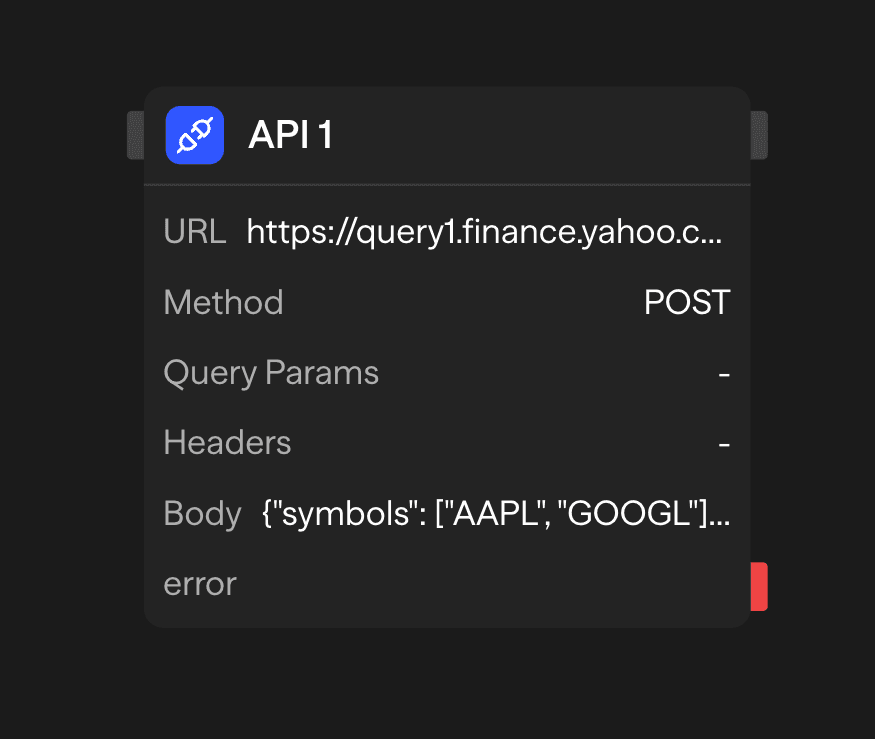
Configuration Options
URL
The endpoint URL for the API request. This can be:
- A static URL entered directly in the block
- A dynamic URL connected from another block's output
- A URL with path parameters
Method
Select the HTTP method for your request:
- GET: Retrieve data from the server
- POST: Send data to the server to create a resource
- PUT: Update an existing resource on the server
- DELETE: Remove a resource from the server
- PATCH: Partially update an existing resource
Query Parameters
Define key-value pairs that will be appended to the URL as query parameters. For example:
Key: apiKey
Value: your_api_key_here

Key: limit
Value: 10
These would be added to the URL as ?apiKey=your_api_key_here&limit=10.
Headers
Configure HTTP headers for your request. Common headers include:
Key: Content-Type
Value: application/json

Key: Authorization
Value: Bearer your_token_here
Request Body
For methods that support a request body (POST, PUT, PATCH), you can define the data to send. The body can be:
- JSON data entered directly in the block
- Data connected from another block's output
- Dynamically generated during workflow execution
The block sends the body as JSON with Content-Type: application/json unless you set that header yourself. If you set Content-Type to application/x-www-form-urlencoded, the block converts an object body to a URL-encoded string before sending.
Timeout (ms)
How long to wait for a response before the request fails, in milliseconds. The setting is under Advanced. The default is 300,000 ms (5 minutes). The block clamps values above the platform ceiling to that ceiling (see the FAQ).
Accessing Results
After an API request completes, you can access its outputs:
<api.data>: The response body data from the API<api.status>: HTTP status code (200, 404, 500, etc.)<api.headers>: Response headers from the server
Advanced Features
Dynamic URL Construction
Build URLs dynamically using variables from previous blocks:
// In a Function block before the API
const userId = <start.userId>;
const apiUrl = `https://api.example.com/users/${userId}/profile`;
Request Retries
The API block supports configurable retries (see the block’s Advanced settings):
- Retries: Number of retry attempts (additional tries after the first request), up to 10
- Retry delay (ms): Initial delay before retrying (uses exponential backoff)
- Max retry delay (ms): Maximum delay between retries
- Retry non-idempotent methods: Allow retries for POST/PATCH (may create duplicate requests). GET, HEAD, PUT, and DELETE are retried without this switch
Retries are attempted for:
- Network/connection failures and timeouts (with exponential backoff)
- Rate limits (429) and server errors (5xx)
Each retry waits twice as long as the one before, up to the maximum delay. The block subtracts a random jitter of up to half the wait, so parallel requests do not retry in lockstep.
Response Validation
Validate API responses before processing:
// In a Function block after the API
if (<api.status> === 200) {
  const data = <api.data>;
  // Process successful response
} else {
  // Handle error response
  console.error(`API Error: ${<api.status>}`);
}
Outputs
<api.data>: Response body data from the API. Parsed as JSON when the response isapplication/json, returned as text otherwise. Binary responses (PDFs, spreadsheets, archives, images, audio, video,application/octet-stream) are returned base64-encoded<api.status>: HTTP status code<api.headers>: Response headers<api.encoding>:base64, present only whendatais a base64-encoded binary body
Example Use Cases
Fetch User Profile Data - Retrieve user information from external service
Function (Build ID) → API (GET /users/{id}) → Function (Format) → ResponsePayment Processing - Process payment through Stripe API
Function (Validate) → API (Stripe) → Condition (Success) → Supabase (Update)Best Practices
- Use environment variables for sensitive data: Don't hardcode API keys or credentials
- Handle errors gracefully: Connect error handling logic for failed requests
- Validate responses: Check status codes and response formats before processing data
- Respect rate limits: Be mindful of API rate limits and implement appropriate throttling