The Loop block is a container that executes blocks repeatedly. Iterate over collections, repeat operations a fixed number of times, or continue while a condition is met.
Loop blocks are container nodes that hold other blocks inside them. The contained blocks execute multiple times based on your configuration.
Configuration Options
Loop Type
Choose between four types of loops:
For Loop (Iterations) - A numeric loop that executes a fixed number of times:
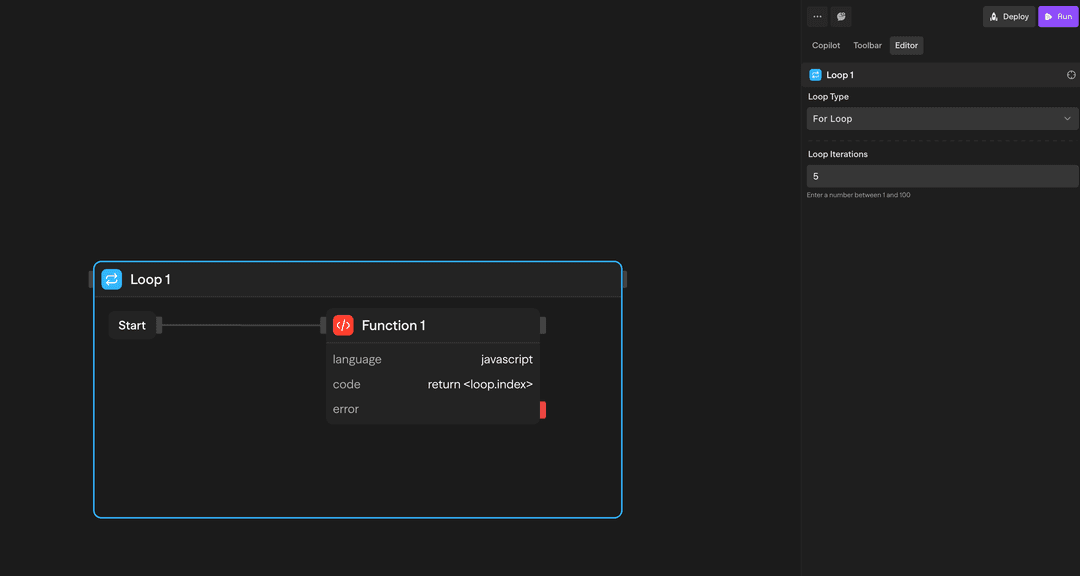
Use this when you need to repeat an operation a specific number of times.
Example: Run 5 times
- Iteration 1
- Iteration 2
- Iteration 3
- Iteration 4
- Iteration 5
A Variables block substitutes references but does not evaluate expressions, so i = <variable.i> + 1 fails with an invalid-number error. Compute the new value in a Function block and assign its result.
Condition Evaluation
While and Do While conditions are JavaScript expressions. Before each check, SteelEngine replaces every <block.field> and <variable.name> reference with its current value. Strings are quoted, numbers and booleans are inserted as-is, and objects are inserted as JSON. SteelEngine then evaluates the expression in an isolated sandbox with a 5-second timeout and coerces the result to a boolean.
<variable.i> < 10
<variable.status> !== "done"
<variable.remaining> > 0 && <variable.attempts> < 5
If the condition throws or times out, it evaluates to false and the loop exits. A While loop with no condition never runs. A Do While loop with no condition falls back to a fixed iteration count.
How to Use Loops
Creating a Loop
- Drag a Loop block from the toolbar onto your canvas
- Configure the loop type and parameters
- Drag other blocks inside the loop container
- Connect the blocks as needed
Referencing Loop Data
There's an important distinction between referencing loop data from inside vs outside the loop:
Inside the loop, use <loop.> references to access the current iteration context:
<loop.index>: Current iteration number (0-based)<loop.currentItem>: Current item being processed (forEach only)<loop.items>: Full collection being iterated (forEach only)
// Inside a Function block within the loop
const idx = <loop.index>;           // 0, 1, 2, ...
const item = <loop.currentItem>;    // Current item
<loop.iteration> and <loop.item> are accepted aliases for <loop.index> and <loop.currentItem>. You can also drill into the current item with a path, for example <loop.currentItem.email>.
These references are only available for blocks inside the loop container. They give you access to the current iteration's context.
Example Use Cases
Processing API Results - For Each loop processes customer records from an API
API (Fetch) → Loop (For Each) → Agent (Analyze) → Function (Store)Iterative Content Generation - For loop generates multiple content variations
Loop (5x) → Agent (Generate) → Evaluator (Score) → Function (Select Best)Counter with While Loop - While loop processes items with counter
Variables (i=0) → Loop (While i<10) → Agent (Process) → Function (i + 1) → Variables (i = function.result)Advanced Features
Failure Handling
When a block inside the loop body fails, the loop does not stop. SteelEngine records the failure as a rejected cell for that iteration. It skips the blocks connected after the failed block for the rest of that iteration. The loop then continues with the next iteration (or the next condition check). After the loop exits, downstream blocks see the failure in <blockname.results> and can decide what to do with it.
Configuration errors are different. These fail the Loop block itself before any iteration runs:
- An empty or unresolvable collection
- A count above 1,000
- A collection larger than 1,000 items
Limitations
Container blocks (Loops and Parallels) support nesting. You can place loops inside loops, parallels inside loops, and any combination of container blocks to build complex multi-dimensional workflows.
Each loop executes its own iterations sequentially. Separate loops inside different Parallel branches can make progress concurrently when nested parallel execution is enabled. See Parallel limitations.
Inputs and Outputs
Loop Type: Choose between 'for', 'forEach', 'while', or 'doWhile'
Iterations: Number of times to execute (for loops)
Collection: Array or object to iterate over (forEach loops)
Condition: Boolean expression to evaluate (while/do-while loops)
Best Practices
- Set reasonable limits: Keep iteration counts reasonable to avoid long execution times
- Use For Each for collections: When processing arrays or objects, use For Each instead of For loops
- Handle errors gracefully: Consider adding error handling inside loops for robust workflows