The Parallel block is a container that executes multiple instances concurrently for faster workflow processing. Process items simultaneously instead of sequentially.
Parallel blocks are container nodes that execute their contents multiple times simultaneously, unlike loops which execute sequentially.
Configuration Options
Parallel Type
Choose between two types of parallel execution:
Parallel Count (count-based) - Execute a fixed number of parallel instances:
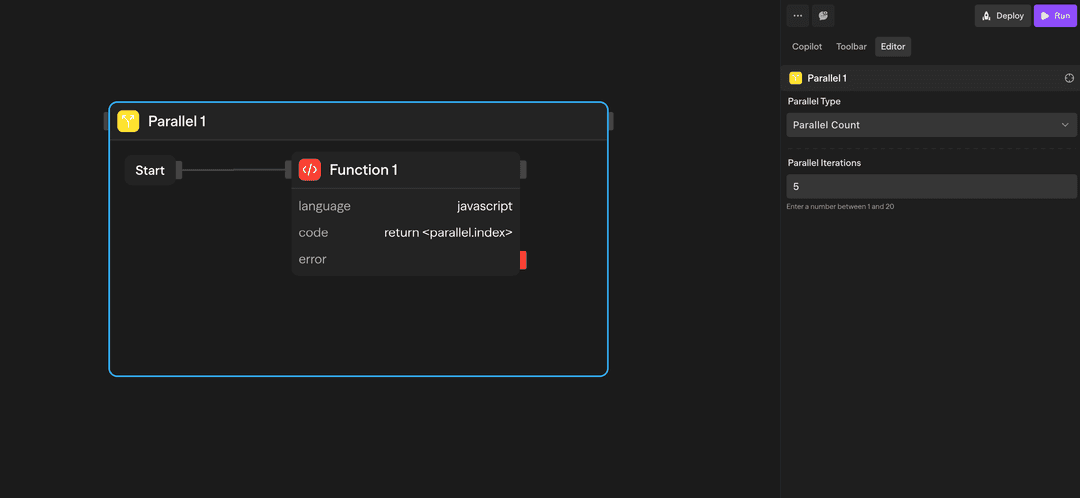
Use this when you need to run the same operation multiple times concurrently.
Example: Run 5 parallel instances
- Instance 1 ┐
- Instance 2 ├─ All execute simultaneously
- Instance 3 │
- Instance 4 │
- Instance 5 ┘
How to Use Parallel Blocks
Creating a Parallel Block
- Drag a Parallel block from the toolbar onto your canvas
- Configure the parallel type and parameters
- Drag the blocks that should run in each instance inside the parallel container
- Connect the blocks as needed
Referencing Parallel Data
There's an important distinction between referencing parallel data from inside vs outside the parallel block:
Inside the parallel, use <parallel.> references to access the current instance context:
<parallel.index>: Current instance number (0-based)<parallel.currentItem>: Item for this instance (collection-based only)<parallel.items>: Full collection being distributed (collection-based only)
// Inside a Function block within the parallel
const idx = <parallel.index>;           // 0, 1, 2, ...
const item = <parallel.currentItem>;    // This instance's item
These references are only available for blocks inside the parallel container. They give you access to the current instance's context.
Example Use Cases
Batch API Processing - Process multiple API calls simultaneously
Parallel (Collection) → API (Call Endpoint) → Function (Aggregate)Multi-Model AI Processing - Get responses from multiple AI models concurrently
Parallel (["gpt-4o", "claude-sonnet-4-5", "gemini-2.5-pro"]) → Agent → Evaluator (Select Best)Advanced Features
Result Aggregation
SteelEngine collects the results from all parallel instances and makes them accessible via the block name. results[i] is the array of settled cells for instance i, so the output keeps the input order even though the instances ran concurrently:
// In a Function block after a parallel named "Process Tasks"
const instances = <processtasks.results>;
const succeeded = instances.flat().filter((cell) => cell.status === 'fulfilled');
const failed = instances.flat().filter((cell) => cell.status === 'rejected');
return { values: succeeded.map((cell) => cell.value), errors: failed.map((cell) => cell.error) };
Instance Isolation
Each parallel instance runs independently:
- Its own
<parallel.index>,<parallel.currentItem>, and block outputs. One instance cannot reference a block in a sibling instance - Workflow variables (
<variable.name>) are shared across the whole run, not per instance, so avoid writing them from inside a parallel - Failures in one instance don't affect others. A failed block becomes a
rejectedcell in that instance's results. The rest of that instance is skipped, and the other instances finish normally
Limitations
Container blocks (Loops and Parallels) support nesting. You can place parallels inside parallels, loops inside parallels, and any combination of container blocks to build complex multi-dimensional workflows.
For a Loop inside each Parallel branch, overlapping work across branches depends on the deployment's TEMPORAL_NESTED_PARALLEL_COHORTS setting. When enabled, ready blocks from different branches can run together while each loop's iterations remain sequential. Self-hosted Workers default to false; operators must upgrade every Worker before enabling it. See Temporal environment variables.
While parallel execution is faster, be mindful of:
- API rate limits when making concurrent requests
- Memory usage with large datasets
- The 20-instance limit: a count or collection above 20 fails the block with "Parallel branch count (N) exceeds maximum allowed (20). Execution blocked." For larger collections use the Parallel Window block. It processes up to 1,000 items with a bounded number active at a time.
Parallel vs Loop
Understanding when to use each:
| Feature | Parallel | Loop |
|---|---|---|
| Execution | Concurrent | Sequential |
| Speed | Faster for independent operations | Slower but ordered |
| Order | Results indexed by instance, so input order is preserved | Maintains order |
| Use case | Independent operations | Dependent operations |
| Resource usage | Higher | Lower |
Inputs and Outputs
Parallel Type: Choose between 'count' or 'collection'
Count: Number of instances to run (count-based)
Collection: Array or object to distribute (collection-based)
Best Practices
- Independent operations only: Ensure operations don't depend on each other
- Handle rate limits: Add delays or throttling for API-heavy workflows
- Error handling: Each instance should handle its own errors gracefully