The Condition block branches workflow execution based on boolean expressions. Evaluate conditions using previous block outputs and route to different paths without requiring an LLM.
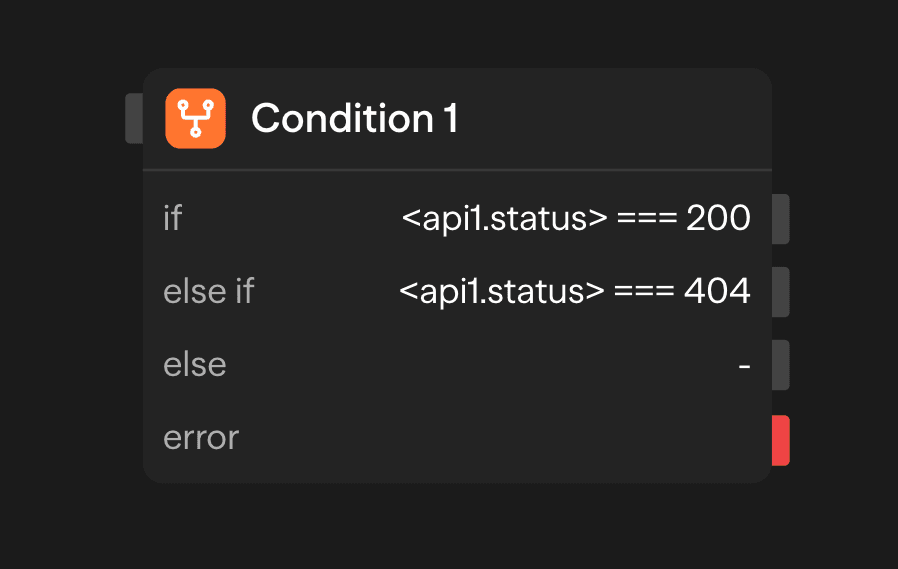
Configuration Options
Conditions
A Condition block is an if / else if / else chain. It starts with an if branch and an else branch. Add more branches and they become else if in between. Each if and else if branch has:
- Expression: A JavaScript expression that evaluates to true or false
The else branch has no expression and cannot be removed. Each branch has its own output handle on the block. Connect a handle to the block that should run when that branch is chosen. SteelEngine evaluates branches in order. The first expression that evaluates to true determines the execution path.
Condition Expression Format
Conditions use JavaScript syntax and can reference input values from previous blocks.
// Check if a score is above a threshold
<agent.score> > 75
Accessing Results
After a condition evaluates, you can access its outputs:
<condition.conditionResult>: Boolean result of the condition evaluation<condition.selectedOption>: ID of the condition that was matched<condition.selectedPath>: Details of the chosen routing destination
Advanced Features
Complex Expressions
Use JavaScript operators and functions in conditions:
// String operations
<user.email>.endsWith('@company.com')

// Array operations
<api.tags>.includes('urgent')

// Mathematical operations
<agent.confidence> * 100 > 85

// Date comparisons
new Date(<api.created_at>) > new Date('2024-01-01')
Multiple Condition Evaluation
Conditions are evaluated in order until one matches. When none match, the else branch is chosen:
// if: Check for high priority
<ticket.priority> === 'high'

// else if: Check for urgent keywords
<ticket.subject>.toLowerCase().includes('urgent')

// else: everything that did not match above
Evaluation Context and Passthrough
Expressions run against the output of the block connected to the Condition's input. That output is also available inside the expression as the context object. Each expression must finish within 5 seconds.
The Condition block passes that upstream output through. Its own output is the source block's output, minus tokens, cost, model, toolCalls, providerTiming, and error. It adds conditionResult, selectedPath, and selectedOption. Downstream blocks can therefore read <condition1.field> for any field the source block produced.
Error Handling
If a condition expression references an undefined variable or throws a runtime error, the block will throw an error and the execution will fail (or follow the error path if one is connected). Use optional chaining (?.) or explicit null checks in your expressions to handle missing values safely.
Outputs
<condition.conditionResult>: Boolean result of the evaluation<condition.selectedOption>: ID of the matched condition<condition.selectedPath>: Details of the chosen routing destination
Example Use Cases
Customer Support Routing - Route tickets based on priority
API (Ticket) → Condition (priority === 'high') → Agent (Escalation) or Agent (Standard)Content Moderation - Filter content based on analysis
Agent (Analyze) → Condition (toxicity > 0.7) → Moderation or PublishUser Onboarding Flow - Personalize onboarding based on user type
Function (Process) → Condition (account_type === 'enterprise') → Advanced or SimpleBest Practices
- Order conditions correctly: Place more specific conditions before general ones to ensure specific logic takes precedence over fallbacks
- Use the else branch when needed: If no conditions match and the else branch is not connected, the workflow branch will end gracefully. Connect the else branch if you need a fallback path for unmatched cases
- Keep expressions simple: Use clear, straightforward boolean expressions for better readability and easier debugging
- Test edge cases: Verify conditions handle boundary values correctly by testing with values at the edges of your condition ranges