The Laya Decision block answers a typed question about text or JSON and returns the answer with probabilities. It never writes free text. Use it to route a message, decide yes or no, or rate something on a scale, then branch on the answer or a probability with a Condition block.
Laya is a small decision model that SteelEngine runs on its own infrastructure. That makes the block different from model-backed blocks in three ways:
- No API key and no per-call cost. There is nothing to add under Bring Your Own Keys, and runs carry no token or model charges for this block.
- Your data stays with SteelEngine. State and questions are never sent to a third-party AI provider.
- Fast, in 100+ languages. Most answers take well under a second. Laya detects the language of the State and answers non-English text with its multilingual model.
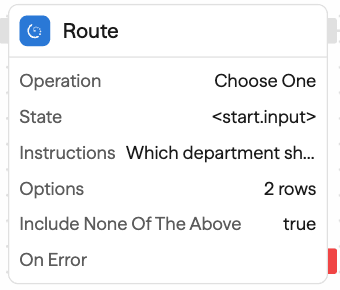
Laya Decision appears in the toolbar, search, and Chat only in workspaces where Laya is available. If you don't see it, use the Judgment block, which asks the same kinds of questions with TypeSafe's model.
When to use Laya Decision
Laya is a fast classifier, not a chat model. It fits decisions with a few clear outcomes that you would otherwise hand to an Agent just to get one word back:
- Routing a ticket, email, or form submission to a team
- Screening messages before a more expensive step: is it spam, is it about an order, does it mention a refund
- Flagging risk or urgency so a Human in the Loop step can review it
- Tagging records in bulk inside a Loop
For decisions that need reading a long document, reasoning across facts, or many options, use the Judgment block or an Agent.
Operations
Choose One
Pick one option for the State.
- Options: one row per option with a slug and a description. Slugs must match
^[a-z0-9_]+$because they become reference paths, for example<laya.probabilities.billing>. Describe each option in plain words; the description is what Laya compares against. - Include none of the above: adds an option with the fixed slug
nonefor when no listed option applies.
Outputs answer (the chosen slug), probabilities keyed by slug and summing to 1, and confidence.
Yes or No
Decide whether a condition holds.
- Yes threshold: the yes probability at or above which
answeristrue. Default 0.5.
Outputs answer as a boolean, and probabilities.yes and probabilities.no.
Score
Place the State on an ordered scale.
- Levels: two to ten level descriptions in order, lowest first. Write each level as a situation that stands on its own, such as "Can wait a week", rather than just "low".
Outputs answer (the description of the most likely level), level (its index, starting at 0), score (the probability-weighted position, which can fall between levels), probabilities keyed by level index, legend, and confidence.
Ask Several
Ask up to 64 questions about one State in a single request. Use it instead of chaining several Laya Decision blocks on the same text: Laya answers every question in one pass.
- Questions: a builder with one card per question. Give each an Id (lowercase letters, digits, and underscores), pick a Type of Choose one, Yes or no, or Score, write the Instructions, and fill in that type's options, threshold, or levels.
Chat and the API write the same questions as a JSON object keyed by id:
{
  "team": {
    "type": "choose_one",
    "instructions": "Which team should handle this message?",
    "options": { "billing": "Invoices, charges, or refunds", "technical": "Bugs, outages, or error messages" },
    "includeNone": true
  },
  "refund": { "type": "yes_no", "instructions": "Is a refund requested?", "threshold": 0.7 },
  "mood": {
    "type": "score",
    "instructions": "How upset is the sender?",
    "levels": ["Calm and polite", "Annoyed but civil", "Angry"]
  }
}
Outputs answers, with one entry per question id shaped like the matching single-question operation: <laya.answers.team.answer>, <laya.answers.team.probabilities.billing>, <laya.answers.refund.probabilities.yes>, <laya.answers.mood.level>, and so on.
Configuration Options
State
The text or JSON to decide on. Reference a block output such as <agent.content> or <start.input>, or enter text directly. JSON text is read as structured state.
Laya reads about 500 tokens of English text and about 1,000 tokens in other languages, so keep State to what the question needs: a subject and body rather than a whole email thread, for example.
A reference such as <agent.content> that is still unresolved when the block runs fails the run, so a misspelled block name does not reach Laya. Angle-bracket text without a field path, such as the masks <person> or <url> in redacted email, is passed through as text.
Instructions
The question to answer about the State, as literal text. A reference tag such as <agent.content> inside Instructions, an option description, or a level description fails the run before anything is sent. Put dynamic content in State only, so text from a user or another system can never rewrite the question.
Model (advanced)
Leave empty to use Laya's stock models: it reads the language of the State and answers with its English or multilingual model. To use a model fine-tuned for your workspace, enter the checkpoint name your SteelEngine contact gives you. A name the Laya server does not have fails the run with that name in the error.
If Laya is busy or still starting up, for example while extra capacity comes online for a large batch, the block waits and tries again for up to two minutes before it fails with Laya is busy. Try again shortly. A request that gets no answer within 30 seconds fails right away with Laya did not answer in time.
Outputs
Every operation also outputs provider (always laya) and checkpoint: the model you selected, or english or multilingual, whichever of Laya's models answered.
| Path | Choose One | Yes or No | Score |
|---|---|---|---|
<laya.answer> | slug | boolean | level description |
<laya.probabilities.<key>> | per slug | yes, no | per level index |
<laya.confidence> | yes | no | yes |
<laya.level> | no | no | yes |
<laya.score> | no | no | yes |
<laya.legend> | no | no | yes |
<laya.checkpoint> | yes | yes | yes |
Ask Several nests the same fields under <laya.answers.<id>.…>, one entry per question, and has no top-level answer.
Example Use Cases
Route support email with a human fallback
Gmail Trigger → Laya Decision (Choose One: billing, technical, sales) → Condition (<laya.probabilities.billing> > 0.8) → Billing queue, or Human in the LoopTriage in one call
Webhook → Laya Decision (Ask Several: team, refund, mood) → Condition (<laya.answers.mood.level> >= 2) → Escalate, or ReplyScreen before an expensive step
Loop over messages → Laya Decision (Yes or No: "Is this message about an existing order?") → Condition (<laya.answer> === true) → AgentBest Practices
- Branch on probabilities, and keep a human fallback. Laya's probabilities run high, so
<laya.probabilities.billing> > 0.8is safer than<laya.answer> === 'billing'. Send the rest to a Human in the Loop block, especially before irreversible actions such as sending mail or issuing refunds. - Keep option lists short and distinct. Accuracy drops as options multiply or overlap. Split a long list into two questions, for example department first and topic second.
- Prefer Choose One and Yes or No. Score is Laya's weakest question type. When you need a scale, describe each level concretely.
- Keep State focused. Laya reads a limited amount of text; give it the part of the message the question is about.
- Ask several questions in one block. Ask Several answers every question about one State in a single pass.
- Move up to Judgment or an Agent when the decision needs reasoning. Laya does not count, compare dates, or follow multi-step logic.
Turning Laya on or off
Laya is listed in the model controls like any other model, as Laya (Laya Decision block):
- Organization admins turn it off for every workspace under Organization Settings → Models → Model availability. This requires
organization:manage_models. - Workspaces can turn it off for one workspace under Settings → BYOK → Workspace model overrides. A workspace cannot turn it back on when the organization has turned it off.
While Laya is off, the Laya Decision block is hidden from the toolbar and search. Workflows that already contain the block fail at that block with Laya is turned off for this workspace before anything is sent, so pair it with an error path if you expect admins to change the setting.
Data and Privacy
State and questions are processed by Laya on SteelEngine's infrastructure and are not sent to any third-party AI provider. Like other block inputs and outputs, they are stored in your execution logs.